Architecture Patterns for Integrating Agents into Knowledge Work
There's only so long you can run around inside an organization saying "I will use the AI" before someone starts eventually questioning just what hell you actually mean.
In this article I'm going to put together a framework for you to work through to frame how you will integrate large language model functionality into your existing business' workflows.
Knowledge work architecture is the discipline of structuring a data platform so that it converts raw information—orders, claims, payments—into revenue-generating insight with maximum efficiency. It recognizes that companies don’t buy technology for its own sake; they buy productivity, achieved by either speeding up individual workflows or enabling teams to coordinate more smoothly.
For organizations to get any value out of LLMs or agents they need to be integrated into applications at the knowledge work layer of a business.
The logic of their analysis involves business rules, internal data from the information layer, and enough LLM "reasoning horsepower" to do the knowledge work task assigned. Then the output needs to be integrated back into existing knowledge work workflows (e.g., PowerBI, Excel, etc) in the line of business.
In this article we take a look at some key ways to integrate agents into existing Knowledge Work Layer applications and the architecture considerations you'll need to make. Let's start out by taking a look at some application integration patterns for agents in the enterprise.
Application Integration Patterns for Agents
How you deploy and integrate your agent functionality should depend on what type of application is integrating with the agent.
To accelerate knowledge work with LLMs we have to integrate automated reasoning over data directly into the applications where the knowledge work occurs.
The next wave of GenAI applications will move the analysis out of ChatGPT and Claude Code and directly embed the analysis into applications, reports, and dashboards directly.
My gut says, based on customer discussions, past architecture trends, and the unique ability to leverage LLM reasoning, is that LLM inference likely ends up integrating wherever SQL rows go in enterprise.
To frame your thinking let's start with 3 major ways you can use generative AI in an organization and then work to build out general architectures for each.
The 3 Types of Generative AI Applications
Today there are 3 major types of generative AI applications (with 3 examples of each type below):
- Conversational User Interfaces
- Web Chat User Interfaces (example: Retail Product Support via Chat Interface)
- Slackbots
- Text Message interfaces via cell phones
- Workflow Automation
- Structured Information Extraction (example: Contract SLA Terms Extraction)
- Industry specific task workflows (e.g., "report generation for distribution center analysis")
- Batch jobs, SQL Tables Scans
- Decision Intelligence
- Automated Insights (example: Automated Analysis of KPIs with Business Rules)
- Next Action
- Root Cause Analysis
For our framework we want to classify our use case into one of these buckets and then start working through the end-user goals and performance attributes we need to deliver information to our knowledge workers. In enterprise software you always in the business of delivering "materialized views".
Games of Materialized Views
In terms of architecture design decisions, most (if not all) enterprise platform architectures boil down to “Games of Materialized Views”.
Modern enterprise software can be understood as a vast ecosystem of materialized-view generators. Nearly every application—ERP, CRM, BI dashboards, supply-chain tools, financial systems—exists to transform raw operational data into precomputed, structured representations that knowledge workers can use without recomputing anything themselves. Every screen, KPI, dashboard, and workflow is effectively a materialized view: a stored, continuously refreshed snapshot of underlying tables, events, and relationships. Enterprise architecture is therefore the discipline of maintaining thousands of these views across systems, ensuring they stay synchronized, consistent, and performant as data changes.
In this framing, traditional data warehouses, semantic layers, and BI tools are simply explicit implementations of the same idea—hierarchies of materialized views built to optimize complex, repetitive analytical computation. Generative AI extends this paradigm by enabling dynamic, personalized materialized views, synthesizing structured answers or analyses on demand from underlying data and documents. Taken together, the entire enterprise knowledge-work stack becomes a multi-layered materialized-view machine, designed to precompute and deliver the information workers need to think, plan, and act efficiently.
The other consideration is the latency at which we produce the materialized view. Invariably when you ask someone if they want "real time information" they will answer "of course" --- even if that information is used once a day.
There's No Such Thing as Real Time
"Real Time" is a relative and subject idea around how fast you can pull together the raw data into usable information for your line of business knowledge work.
Do not buy into the marketing hype around real time, there is no such thing. "Real time data" to a marketing company is different from "real time data" for a high-frequenecy trading company.
Do develop a real understanding on how frequently you need to make decisions on data and invest in data integration technologies as appropriate --- because as view materialization latency approaches "zero", the cost to produce the view materialization approaches ... infinity.
Now that we've established the core 3 types of generative AI applications (and I've gone on a rant about "materialized views"), let's define the 3 general architectures for integrating agents into these applications.
Architecture Patterns for Agent Integration
In this section I introduce 3 variations of a common knowledge work architecture pattern that match up to the requirements for each type of generative AI application.
Most generative AI use cases have the following components for the agent part of the system:
- prompt instructions
- the right contextual data to analyze
- a LLM with enough "reasoning horsepower"
However, that just covers the logic part of the agent. There is a larger application architecture to consider and we want to define where the agent should live, what systems it has access to, and what kind of security is needed.
We need to keep in mind some key considerations when layout out our agent-based architecture:
- Does the agent need secure access to private enterprise data warehouse?
- Are we injecting customer information into prompts, exposing customer data to external systems?
- Is the application user interface (e.g., "dashboard") running inside our network or exposed to external customers?
With this in mind let's define the 3 architectures.
Conversational User Interfaces
Conversational user intefaces are what most folks are using today (e.g., "ChatGPT", "Anthropic's Claude Code", etc) and that involves pulling your instructions and data into their platform to peform reasoning with LLMs in the course of your conversation and instructions.
The advantage of using these external conversational user interfaces is that they are already put together and can easily pull your data into them. The downside is that its hard to "share your ChatGPT to customers in a professional and brand-controlled way". Application integration with external systems is a large and complex subject and has many caveats to consider.
As we move forward with integrating conversational user interfaces beyond ChatGPT (and upgrading legacy text interfaces), there are 3 sub-areas where conversational user interfaces are emerging today:
- Web Chat User Interfaces
- Slackbots
- Text Message interfaces via cell phones
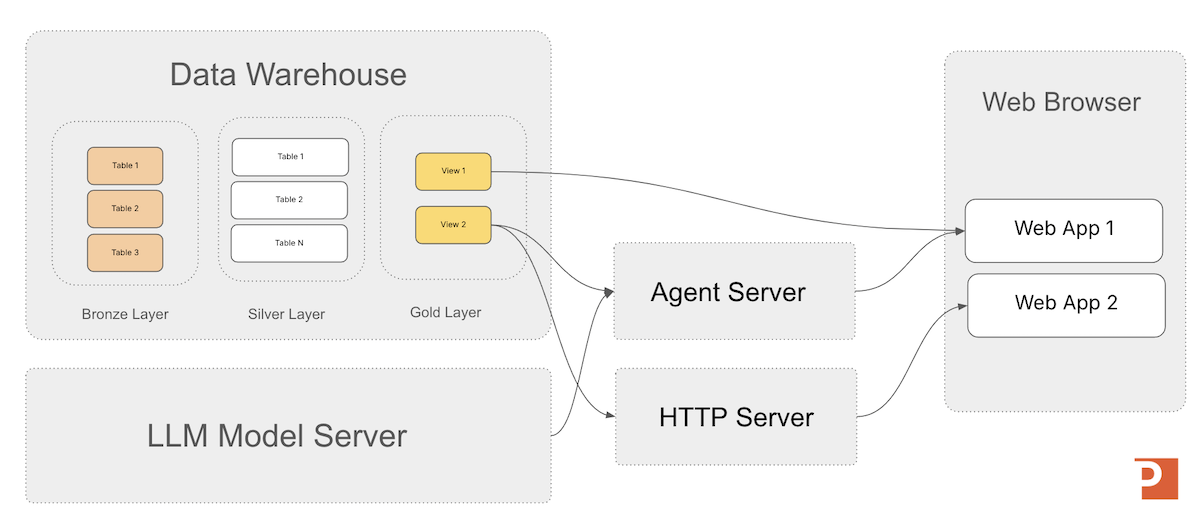
In the architecture diagram below I show a general architecture pattern for integrating an agent into your conversational user interfaces that use your enterprise data models to provide a customer-specific experience in your own branded applications. It's worth noting in the case of text-message applicaitons that you wouldn't be using a traditional "web browser", but many of the core concepts stay the same for the conversational part.
Let's now shift gears from conversational user interfaces to accelerating business workflows with generative AI architectures.
Workflow Automation
Generative-AI workflow automation is the integration of cognitive, context-aware decision-making into traditional automation so that organizations can handle both structured and free-text tasks end-to-end, bridge legacy systems, and improve operational execution.
Examples of workflow automation include:
- Structured Information Extraction
- Industry specific task workflows (e.g., "report generation for distribution center analysis")
- Batch jobs, SQL Tables Scans
Additionally, workflow automation may or may not be a user interface component to the system, depending on if you want a human to review the work before its committed back into the information processing stream. In cases such as "structured information extraction from free text" you generally would not have a human in the loop, but someone may want to spot check the results to make sure no errors are creeping into the system. This gives us two variations of workflow automation:
- Batch Jobs
- User Interface-based Knowledge Work Workflow Automation
Batch Jobs Workflow Automation
The architecture below shows an example of an agent server scanning a silver layer table, enriching the records, and writing the records back to a new table in the data warehouse.
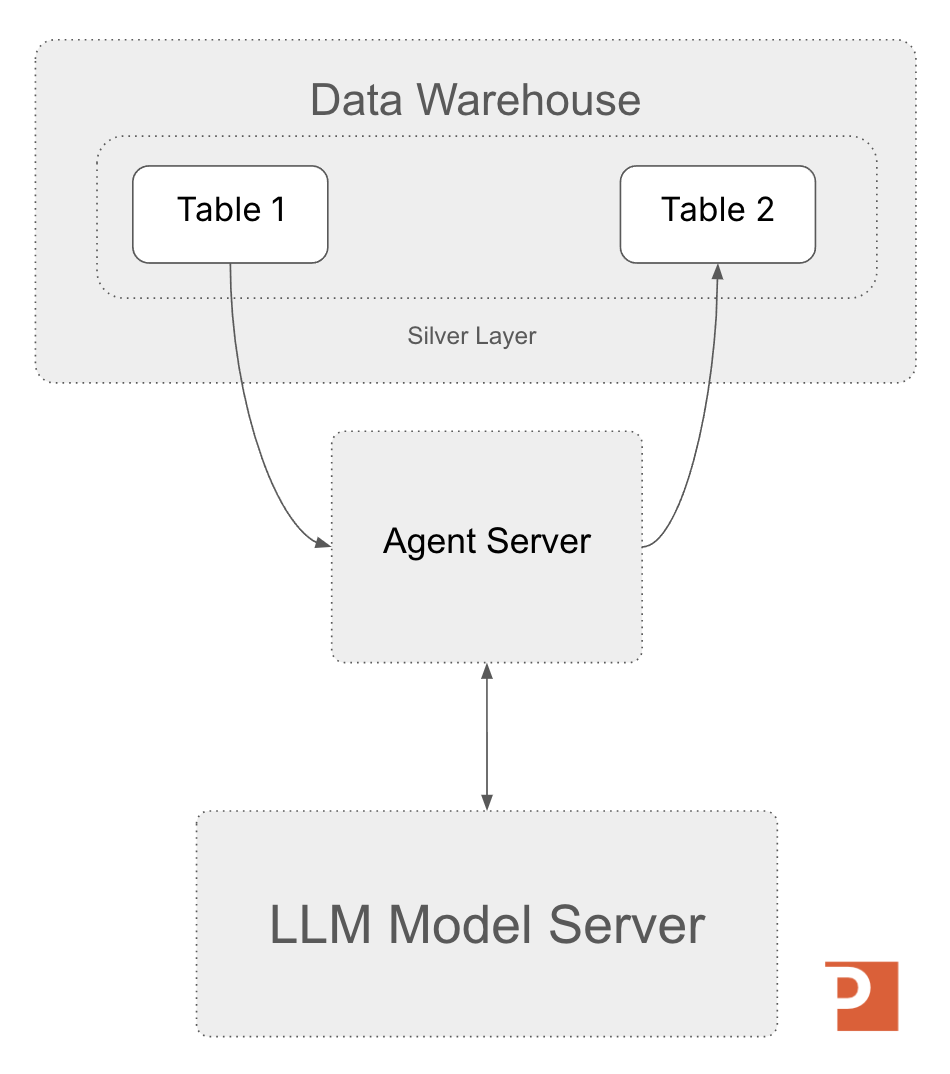
Another architectural consideration here is how the LLM API is accessed from the agent server; if you are scanning millions of records (or files), you may need to consider batching strategies for sending input to the LLM server.
Lower Latency, (Potentially) Higher Engineering Effort
Some situations of large batch scans may require a different integration strategy between the application, agent, and the LLM server.
In these cases its worth exploring ways to load the agent code directly into the application you are building and using batching strategies when calling the LLM server.
Some data platforms, such as Databricks, allow you to even host LLMs on their platforms and call them from SQL such that you can do a direct scan of tables without setting up a full custom architecture. Without an integrated platform such as Databricks, you may end up owning more of the integration strategy and that's something to consider in your "build vs buy" analysis. We'll talk about this more in future articles in this series.
User Interface-based Knowledge Work Workflow Automation
Knowledge work is the primary focus of modern businesses built on processing information (think "financial services", "insurance companies", etc). There are many workflows that involve people looking at screens performing cognitive labor (as opposed to physical labor) and producing more information (or clicking "ok" a lot).
The opportunity for this type of workflow automation involves performing the bulk of the cognitive labor in the agent server itself, presenting the results back to the human in the loop for review. Once the human verifies the work, they press ok to move onto the next record or unit of work. An example of this would be how a TPA in property insurance reviews claims before deciding how to classify them.
In this case the agent-integration strategy is going to look more like our first architecture for conversational user interfaces, as seen again below.
Let's now move on to decision intelligence where our goal is focused on making better quality decision faster.
Decision Intelligence
Decision intelligence is the organizational capability to use generative-AI models to rapidly simulate, evaluate, and narrow complex strategic and operational scenarios so leaders can focus attention on the most promising decisions before committing deeper analytical resources.
Three sub-types of decision intelligence analysis are:
- Automated Insights: look at KPIs for specific areas of the business and automatically apply business logic and rules
- Next Action: look at KPIs for specific areas of the business, apply analysis, and then recommend a next action
- Root Cause Analysis: allow a user to ask questions about the condition of KPIs and why they are high/low/good/bad
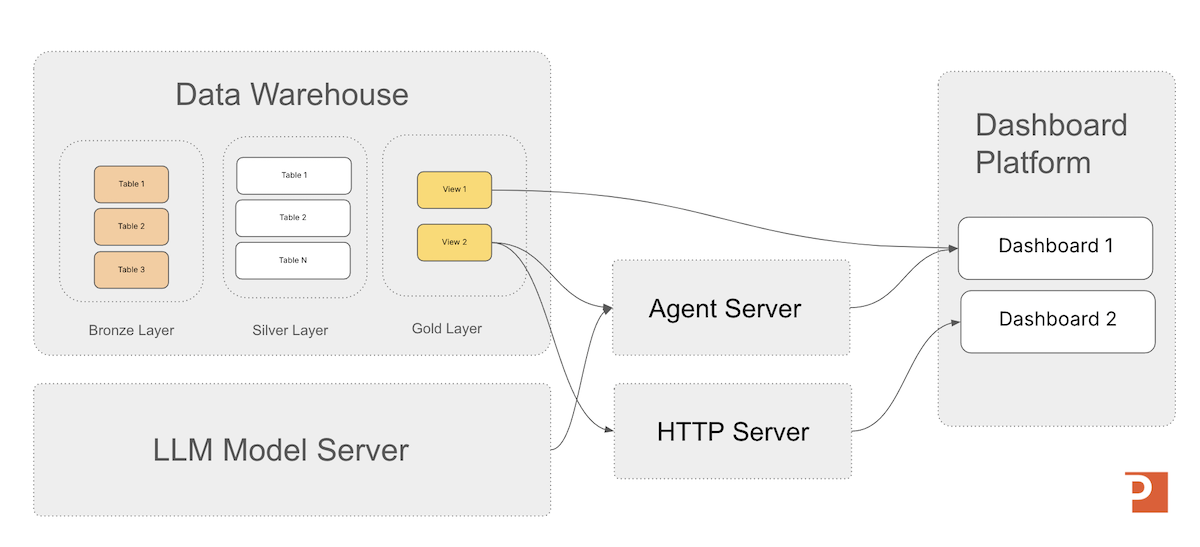
In the architecture diagram below I show a generalized architecture that allows an agent server to combined automated reasoning over business rules/instruction over private enterprise data to deliver accelerated analysis.
Why is Decision Intelligence this useful in practice? It lowers the time to critical decisions in organizations and allows them to make more efficient actions in how they respond to a changing market.
In most cases the user of decision intelligence will be looking at a dashboard (or handheld terminal screen) and will need the most concise and analyzed information possible to make that next critical move.
The underlying processes we can automate will be automated, but ultimately the decisions we care about most are the ones we are most responsible for;
Key decisions are the primary expression of organizational agency, and decision intelligence amplifies that agency by expanding the organization’s ability to understand, anticipate, and intentionally shape its future.
Agent Accelerator
For the Databricks Platform
A 4-week engagement that delivers a custom Decision Intelligence agent on Databricks—grounded in a clear decision owner, explicit business rules, and governed Unity Catalog data models—then deployed to a Databricks Agent Endpoint for testing and production rollout.
Learn MoreThe Agents Have Always Been With Us
They have just traditionally been called "tools".
Agents aren't coming to take your job (unless you don't evolve with tooling, and then that's your fault).
Agents also aren't going to give you every answer --- but they do make the decisions you have to make all the more critical. Leverage generative AI to make better decisions and own your organizational agency.
In the next article we dig into MLflow and how it can be the agent server that powers your generative AI application architectures.
Next in Series
What is MLflow?
MLflow provides a unified framework to manage the entire lifecycle of both traditional ML models and modern LLM agents, which we dig into in detail in this article.
Read next article in series