What is MLflow?
In this guide, we’ll walk through why MLflow is becoming the enterprise standard for agentic workloads, how ResponsesAgent offers a clean and typed development interface. In future articles we'll walk you through how to build a ResponsesAgent agent on MLflow, deploy it, and then integtrate it into an application architecture from the previous article.
MLflow provides the operational foundation required to transform agent logic—prompts, contextual data access, and LLM reasoning—into a governed, production-grade service that can be embedded directly into enterprise knowledge-work applications. Just as data platforms manage the lifecycle of tables and materialized views, MLflow manages the lifecycle of agents by packaging their code and instructions, capturing execution environments, versioning them, and exposing them through standardized REST endpoints.
A Framework to Support Agent Application Architectures
MLflow unifies agent functionality under a consistent, reproducible deployment model, allowing conversational interfaces, workflow automation systems, dashboards, and batch processes to rely on agents with predictable semantics, controlled data access, and trace-level observability. MLflow effectively becomes the enterprise “agent server” layer, enabling secure access to private data, deterministic execution, and lineage-rich transparency wherever knowledge work occurs.
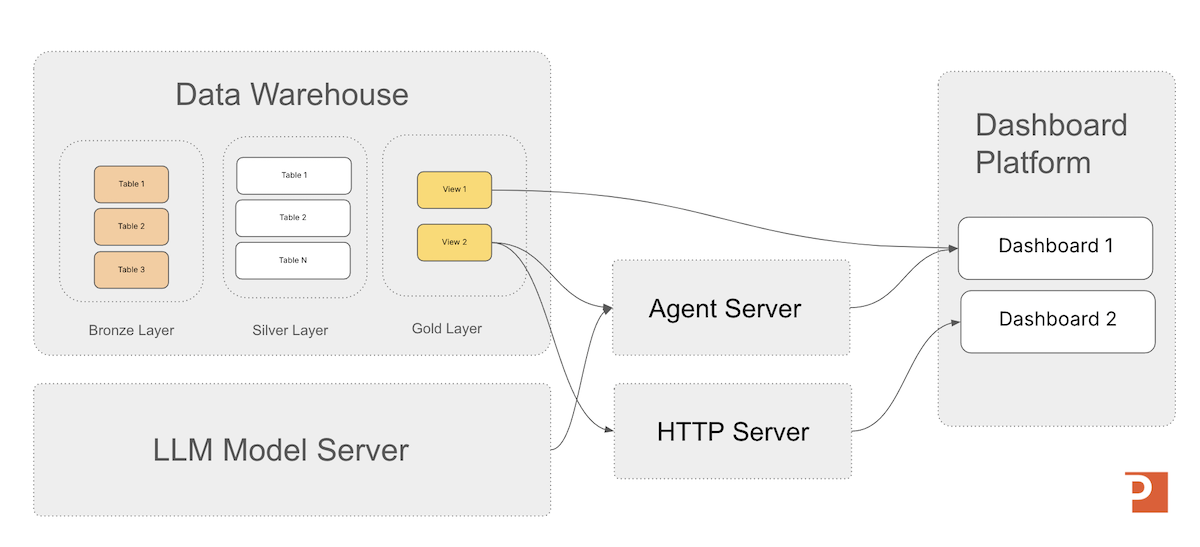
Running agents on MLflow standardizes how teams build, operate, and iterate on agentic systems. By providing the four pillars of enterprise ML—Tracking, Models, Registry, and Serving—MLflow allows agents to inherit the same lifecycle and governance model as any other enterprise ML asset. With features such as environment capture, shadow deployments, rollbacks, version aliasing, and MLflow Tracing, teams gain deep visibility into agent behavior and the ability to evolve configurations safely.
For Databricks users, Unity Catalog strengthens this foundation with enterprise-grade governance across code, tools, and data permissions as it natively integrates with MLflow functionality across the Databricks platform.
Because MLflow is already embedded in most enterprise MLOps stacks, integrating ResponsesAgents becomes straightforward: they can be deployed, evaluated, traced, and governed through the same unified infrastructure that enterprises already trust.
MLflow is organized around four core pillars that support the end-to-end machine learning lifecycle — plus a rapidly growing fifth emerging component focused on real-time production impact.
| Pillar | Purpose | Keyword |
|---|---|---|
| Tracking | Record experiments (metrics, parameters, artifacts) | Observe |
| Models | Standard packaging for easy loading and deployment | Package |
| Model Registry | Governance, approval workflow, version management | Manage |
| Projects | Reproducible execution with consistent environments | Reproduce |
| Deployments (Emerging) | Integrated serving for real-time inference and telemetry | Serve |
Agent Accelerator
For the Databricks Platform
A 4-week engagement that delivers a custom Decision Intelligence agent on Databricks—grounded in a clear decision owner, explicit business rules, and governed Unity Catalog data models—then deployed to a Databricks Agent Endpoint for testing and production rollout.
Learn MoreSupport for Custom Framework Agnostic Agents
In the MLflow api ResponsesAgent acts as a unifying wrapper that cleanly embeds agents built with LangChain, DSPy, custom Python classes, or other tool-orchestration frameworks into the MLflow runtime.
Rather than rewriting agent logic, developers encapsulate their code within the ResponsesAgent class, allowing MLflow to standardize the agent’s inputs, outputs, tool-call semantics, and conversational behavior.
This wrapper ensures agents remain compatible with Databricks AI Playground, Mosaic AI Model Serving, and MLflow’s evaluation and tracing infrastructure without altering the underlying framework-specific implementation.
This abstraction also enables teams to build multi-agent systems with heterogeneous frameworks while maintaining a uniform operational surface area. Every agent—regardless of how it was built—exposes a consistent schema, supports OpenAI-compatible request formatting, and inherits MLflow’s packaging and governance capabilities.
Full Agent Deployment Support
Once you have your agent wrapped in the ResponsesAgent wrapper, deploying to MLflow becomes simpler once you understand the services available to you. These services all support the functionality needed to operate models in a modern generative AI application architecture. Let's start by looking at how MLflow represents models and agents during deployment.
Agent Packaging and Artifacts
Agents in MLflow 3.6 are packaged using the standard MLflow model format, which bundles an agent’s Python code, prompt instructions, configuration files, tool definitions, and environment specification into a single immutable model artifact. Packaging converts a Python-defined ResponsesAgent into a deployable snapshot stored in the MLflow tracking server’s artifact store, ensuring that the model server can reconstruct the exact agent implementation—its code, dependencies, and resources—without relying on the developer’s environment.
In MLflow, these packaged assets are called artifacts: versioned files attached to a run that record everything needed to reproduce or serve the agent, including the MLmodel definition file, Python code directories, YAML configuration, dependency manifests, and any additional resources such as embeddings or retrieval indices. Artifacts serve as the durable, serialized representation of the agent’s logic and supporting assets, enabling consistent behavior across development, staging, and production deployments.
Models from Code
Databricks recommends using MLflow's Models from Code capability for deploying code agents. Under this approach, the agent’s implementation is stored as a Python file, and its execution environment is recorded as a set of required packages. When the agent is deployed, MLflow reconstructs the environment and executes the Python file to load the agent into memory so it can serve inference requests reliably and consistently across deployments.
This enables models to be versioned, moved across environments (dev → test → prod), and deployed consistently with dependencies captured (via Conda or pip).
Runs
Runs are the foundational execution records in MLflow—the system’s mechanism for capturing exactly what happened during a single attempt to execute code, train a model, or invoke an agent. Each run serves as a structured envelope of metadata: the parameters used, the metrics generated, the tags applied, the execution context, and any artifacts produced during that event. In other words, a run is not the model itself, nor the deployment environment; it is the authoritative log of one discrete execution within the MLflow tracking system.
In the context of MLflow 3.6 and ResponsesAgents, a run is created each time the agent’s `predict()` method is invoked (when logging is enabled). This run captures the full inference record: user inputs, agent outputs, reasoning traces, tool calls, timing information, and any produced artifacts. It provides observability and auditability for every agent execution and decouples inference events from deployment or model registration workflows. Put simply, a run in MLflow is the formal, immutable record of a single execution of agent logic—an essential building block for traceability, quality control, and reproducible decision automation.
Traces
In the context of operating an agent logged with mlflow.pyfunc.log_model(), a trace is the structured record of the agent’s internal reasoning steps and tool interactions during a single inference call. While a run captures the overall execution, a trace reveals the detailed workflow the agent followed to produce its output.
A trace may include:
- the sequence of reasoning steps taken by the agent
- intermediate thoughts or chain-of-thought style signals (when enabled)
- tool calls and their inputs/outputs
- intermediate results used to form the final response
- timing information for each internal step
Traces provide the fine-grained observability needed for debugging, validation, and improving agent behavior by showing how the agent arrived at its answer, not just the final output.
Model Tracking
MLflow model tracking provides a structured and governed mechanism for managing LLM-based agents packaged with mlflow.pyfunc.log_model(). When an agent is logged, MLflow creates a run that captures a complete snapshot of the agent’s code, prompts, configuration files, tools, and Python environment. This run becomes the authoritative lineage record for the agent’s behavior at that moment in time, enabling reproducibility and consistent deployment. The pyfunc wrapper standardizes inference through a uniform predict() interface, allowing MLflow’s model server to reliably reconstruct and serve the agent across development, staging, and production environments.
Logging a Model on MLflow
It’s important to distinguish between logging a model and registering a model:
- Logging a Model: Saves a model artifact to the MLflow Tracking Server as part of an experiment run.
- Registering a Model: Adds the saved model to the centralized Model Registry for lifecycle governance and deployment workflows.
Together, these capabilities provide a robust foundation for promoting stable, traceable models into production environments.
Model Registry
Once logged in the Tracking Server, the agent can be registered in the MLflow Model Registry, where it gains lifecycle management capabilities such as versioning, promotion, rollback, and alias-based deployment (e.g., models:/agent_name@Production). This integration ensures that downstream applications remain stable while new agent versions are iterated and deployed behind the scenes. By tracking agents as MLflow models, organizations gain operational reliability, governance, and observability—transforming a Python-defined agent into a production-ready, version-controlled intelligence service.
The Model Registry is the system of record for all production models. It manages versioning, approvals, stages (Staging → Production), and governance. This ensures the right model is always running with full auditability and lineage.
The MLflow Model Registry provides a centralized system for managing all production-bound machine learning models with structure, governance, and collaboration in mind.
- Centralized Model Store: Acts as the single source of truth for all MLflow models — simplifying versioning, discovery, and deployment across teams and environments.
- Rich APIs: Enables programmatic creation, retrieval, updating, and archiving of models, empowering automation across the entire MLOps lifecycle.
- User Interface: A visual dashboard that allows practitioners to inspect versions, transitions, lineage, and model ownership directly from the MLflow UI.
With these capabilities, the Model Registry ensures models move from experimentation to production with traceability, confidence, and control.
Options for Operating MLflow
The MLflow Model Registry (and Tracking Server) are both supported in both open-source (OSS) MLflow and managed enterprise platforms such as Databricks. The functionality remains consistent, but managed platforms extend governance, collaboration, and security capabilities for production-scale operations.
In the OSS version of MLflow, users can manage the full lifecycle of machine learning models through both a UI and rich APIs. This includes registering models, tracking version history, applying tags and descriptions, and promoting models between stages such as Staging and Production. Additionally, you'll have to self manage the MLFflow services either on local hardware or in the cloud.
The latest version of the Databricks cloud platform (with Unity Catalog) includes these services integrated. If you are a Databricks platform user you can configure the services with the UX or with its python APIs.
Deployments (Emerging)
The newest area of expansion in MLflow is integrated Deployments / Model Serving. This simplifies the operational footprint required to deliver real-time inference — directly from the MLflow platform — while capturing cost, telemetry, and performance data for continuous improvement.
Once we work through putting together our first ResponsesAgent in the next article, we'll then work through starting a MLflow Model Server and deploying our agent to the server for application integration.
Summary and Building with ResposesAgent
In this article we explained why and how MLflow is a great option for your "agent server" in your generative AI applications.
ResponsesAgent is MLflow’s native interface for building, packaging, and operating enterprise-grade LLM agents.
In the next article, we’ll walk through how ResponsesAgent offers a clean and typed development interface and why packaging agents as MLflow models unlocks significant governance and deployment benefits. We'll also put together a "hello world" ResponsesAgent so you can walk through the process before we move on to deploying the agent.
Next in Series
Building ResponsesAgent-Based LLM Agents on MLflow
In this guide, we’ll walk through how ResponsesAgent offers a clean and typed development interface and why packaging agents as MLflow models unlocks significant governance and deployment benefits.