Integrating Applications with Deployed MLflow Agent Endpoints
Organizations accelerating knowledge work with large language models increasingly recognize that the real leverage comes not from standalone chat interfaces, but from embedding automated reasoning directly into the applications where work actually happens. MLflow ResponsesAgents enable this shift by providing a standardized, production-grade mechanism to package, deploy, and serve analytical intelligence across diverse application surfaces.
As the next wave of GenAI systems moves analysis out of tools like ChatGPT and Claude Code and into operational software, we must integrate agent-driven reasoning into conversational interfaces, web and Slack chat experiences, automation workflows, structured information-extraction pipelines, industry-specific processes such as distribution-center reporting, batch data jobs, SQL table scans, and higher-order capabilities like decision intelligence, automated insights, next-action guidance, and root-cause analysis.
Ways to Integrate a MLflow ResponsesAgent into Your Application
Integrating MLflow ResponsesAgents into these application patterns creates a foundation for scalable, embedded intelligence that transforms how organizations process information and make decisions.
You can integrate a deployed ResponsesAgent from MLflow 3.6 into your application using either direct local inference or by exposing it as a microservice. The two primary patterns are:
- direct Python integration using the python code with
mlflow.pyfunc.load_model() - HTTP-based integration using a standalone MLflow model server (
mlflow models serve) for REST API access
Both allow you to plug the agent into chat apps, backend services, workflow tools, or batch pipelines.
Now that we've established how we'll do the integration, let's see how this works out per generative AI application type.
Integration Strategies per Application Architecture
In this section we'll work through how each method works best for the 3 major generative AI application architectures:
- Conversational User Interfaces
- Workflow Automation
- Decision Intelligence
We'll start out with a strategy on how to integrate our deployed MLflow ResponsesAgent with a conversational user interface.
Conversational User Interface Agent Integration
Conversational user interfaces can take on multiple forms, but many times they are attempting to answer a user question by using specific data injected into a prompt coupled with specific instructions for this type of answer. One common form of this pattern is retrieval augmented generation (RAG).
Retrieval Augmented Generation (RAG) is an approach that gives large language models access to live, external knowledge so they can deliver more accurate, current, and business-specific answers. Instead of relying only on what a model learned during training, RAG retrieves the most relevant data from trusted sources—such as internal systems, reports, or market feeds—and injects that information into the model’s reasoning process.
These type of applications involve a single input query from the end user that is analyzed and then an agent decides what information it needs to answer the question. This is an ad-hoc style of queries (non-batch oriented) so we can use an Agent server-style of architecture here.
In the image (from the first article in our series on MLflow) below you can see the base MLflow agent server architecture that is a great example to keep in mind while we deploy our agent in this article.
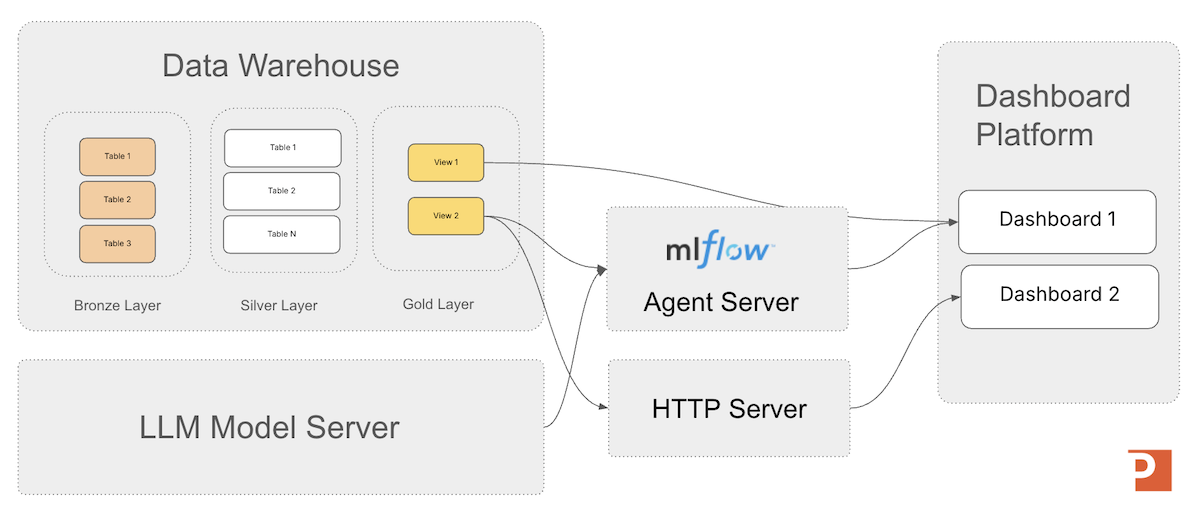
For conversational user interface applications we want to serve the agent as a standalone HTTP endpoint accessible from any programming language with a MLflow 3.6 model server.
The MLflow Model Server
The MLflow Model Server is a lightweight HTTP server that lets you serve any MLflow-packaged model or agent (including MLflow 3.6 ResponsesAgent models) as a REST endpoint without needing to build custom application code. It loads a model from a run or registry location, handles request and response formatting, and exposes a predictable API for inference.
What it can do:
- Host models locally or in production using a simple CLI (
mlflow models serve) or via Docker. - Expose a standardized REST interface for prediction, including JSON input/output schemas enforced by MLflow.
- Serve multiple model flavors, including pyfunc, LLM/agent flavors, transformers, sklearn, and more.
- Handle request validation, batching, and logging depending on the model flavor.
- Integrate easily with downstream applications so dashboards, workflows, services, or automations can call the endpoint through HTTP.
(Note: in the previous article we talked about how to get an agent registered in the MLflow Model Registry.)
To crank up a model server from the command line we'd use the command:
mlflow models serve \
  --model-uri models:/MyMinimalAgent_Registered_2@prod \
  --host 0.0.0.0 \
  --port 5000 \
  --no-conda
Then call the REST API from your your HTTP application; a sample REST call from a python application is below.
import requests

payload = {
    "input": [
        {"role": "user", "content": "hello"}
    ]
}

response = requests.post(
    "http://localhost:5000/invocations",
    json=payload
)

print("Testing hello world registered mlflow ResonsesAgent:")
print(response.json())
Serving agent output with MLflow model server allows completely decoupled deployment so the agent can scale and update independently of the app.
Workflow Automation Agent Integration
Generative AI is redefining workflow automation by adding cognitive decision-making and adaptability to traditional robotic process automation (RPA). While RPA handles structured, repetitive tasks, generative AI expands the scope to include unstructured data and complex judgments.
This fusion allows organizations to automate not just routine operations, but also tasks requiring contextual understanding—such as processing customer requests, analyzing claims data, or interpreting technical diagnostics—making automation more flexible, accurate, and scalable.
Workflow automation may or may not be a user interface component to the system, depending on if you want a human to review the work before its committed back into the information processing stream. In cases such as "structured information extraction from free text" you generally would not have a human in the loop, but someone may want to spot check the results to make sure no errors are creeping into the system. This gives us two variations of workflow automation:
- Batch Jobs
- User Interface-based Knowledge Work Workflow Automation
We'll start with batch jobs first because they have a more rightly integrated style due to the higher number of rows they typically process compared to ad-hoc knowledge work jobs.
Batch Job-Style Integration
When we want to process large amounts of data (typically for a table row-scan operation) we want to eliminate as much latency as possible, so moving a copy of the latest agent locally to your batch application is a smart design stategy. The challenge is going to be getting the correct version of the latest agent, and that's where MLflow can help us again. We can use the MLflow Model Registry with the python MLflow api to get a copy of the correct agent version inside our application and be able to reliably access the agent logic.
We can use the MLflow Model Registry to track stages (Staging, Production), enable rollbacks, and manage agent lifecycles. Your application always loads the live version by referencing:
load_full_model_uri = "models:/" + registered_model_name + "@" + registered_model_stage
model = mlflow.pyfunc.load_model(load_full_model_uri)
This makes upgrades seamless—no code changes required when new versions are deployed.
One of the most expensive things we can do in system-design is a network round trip.
Load the agent directly into your batch job application (e.g., FastAPI, Flask, Django) for the lowest latency. This lets you call the agent inside your service’s process without a network hop.
Inside our batch job application accessing model might looking something like the python example code below.
import mlflow.pyfunc

load_full_model_uri = "models:/" + registered_model_name + "@" + registered_model_stage
model = mlflow.pyfunc.load_model(load_full_model_uri)

result = model.predict({
    "input": [
        {"role": "user", "content": "Why is OTIF down this week?"}
    ]
})

print(result)
This method is ideal for embedding the agent into microservices, scheduled jobs, and evaluation pipelines.
Ad-Hoc Agent Query Integration
In cases where your agent is working with one record at a time, processing the record, and then updating the record in a table (for example) --- then the standard REST interface should work fine for agent deployment.
Again we'd serve the agent as a standalone HTTP endpoint accessible from any programming language via the MLflow model server as shown in the command example below.
mlflow models serve \
  --model-uri models:/MyMinimalAgent_Registered_2@prod \
  --host 0.0.0.0 \
  --port 5000 \
  --no-conda
Once we have the workflow agent deployed, then we can call the REST API from your workflow automation application similar to the example below.
import requests

payload = {
    "input": [
        {"role": "user", "content": "hello"}
    ]
}

response = requests.post(
    "http://localhost:5000/invocations",
    json=payload
)

print("Testing hello world registered mlflow ResonsesAgent:")
print(response.json())
This allows completely decoupled deployment so the model can scale and update independently of the app.
Decision Intelligence Agent Integration
Decision Intelligence is the practice of merging together the right contextual enterprise information with the right business rules applied together to get you to set of decisions you need to overcome obstacles in your organization.
The consuming application of generative AI decision intelligence applications is often dashboard or custom application. This makes it architecturally similar to conversational user interface applications, and so we will follow that design pattern here as well.
Again, we'll serve the agent as a standalone HTTP endpoint accessible from any programming language with the MLflow model server. The command line example below shows an example of a model server being started and referencing (serve -m "models:/my_agent_model/Production") a model registered with the MLflow model registry.
mlflow models serve \
  --model-uri models:/MyMinimalAgent_Registered_2@prod \
  --host 0.0.0.0 \
  --port 5000 \
  --no-conda
And then, from your dashboard logic, make a REST API call in python (as shown below) or any other language that supports REST queries via HTTP.
import requests

payload = {
    "input": [
        {"role": "user", "content": "hello"}
    ]
}

response = requests.post(
    "http://localhost:5000/invocations",
    json=payload
)

print("Testing hello world registered mlflow ResonsesAgent:")
print(response.json())
Typically the output of the analysis will be shown in a card on the dashboard with labels or beside other KPIs, etc.
Agent Accelerator
For the Databricks Platform
A 4-week engagement that delivers a custom Decision Intelligence agent on Databricks—grounded in a clear decision owner, explicit business rules, and governed Unity Catalog data models—then deployed to a Databricks Agent Endpoint for testing and production rollout.
Learn MoreSummary
MLflow offers flexible deployment strategies for ResponsesAgent model integration. Whether embedded directly in a Python service or deployed as a scalable HTTP microservice, MLflow ensures consistent agent lifecycle management, versioning, and reliability across all environments.
Next in Series
Building a Retail Semantic Layer with Unity Catalog Metric Views
This article explains how Databricks Unity Catalog Metric Views create a governed semantic layer that transforms complex retail data into consistent, business-ready insights—empowering teams to accelerate knowledge work and make revenue-driving decisions with confidence.
Read next article in series